
Picture a typical holiday purchase. You ask an AI assistant for gift ideas for your niece, buy the winner in a retailer’s app, pay with a digital wallet and collect cashback in a rewards app. Then you book a flight home. In a single afternoon, your name, address, payment details and a fair amount about the people on your gift list have moved through five apps.
It’s easy to assume an app from a familiar brand is safe by default. The findings below show where that breaks down. Today’s shopping apps are assembled from code and services supplied by many companies. They connect to payment and travel accounts and increasingly link to AI assistants that can search and, in some services, act on your behalf. Every new connection changes what an app can see and do.
Mobile devices accounted for 56% of U.S. online holiday spending in 2025, according to Adobe, which forecasts that U.S. online holiday spending will reach $275.1 billion this year. AI is joining the shopping trip, too. Accenture reports that 40% of shoppers plan to use generative AI for holiday shopping in 2026, up from 30% last year.
“Mobile apps are the largest source of digital revenue during the holiday shopping season. AI assistants are adding a new layer of convenience, complexity and risk to the picture. The revenue stream built on consumer trust must be protected, and that means the mobile app must be protected,” said NowSecure CEO Alan Snyder.
To understand what this means for shoppers, NowSecure researchers used NowSecure Mobile App Risk Intelligence (MARI) to analyze 882 Android and iOS apps across shopping, payments, travel, food delivery, entertainment and AI assistants. That includes 155 shopping apps from 79 retail brands. (We counted the Android and iOS editions of each app separately.) Here’s what we found, and what you can do about it.
Siri and AI Can Already Reach Inside One in Five iPhone Shopping Apps
You don’t need a separate AI app to bring AI into your shopping. It’s already built into the apps you use.
Of the 79 iPhone shopping apps we examined, 16 use a feature called App Intents. App Intents let Siri, Shortcuts and other parts of the iPhone find and carry out actions inside an app, so you can get something done without opening it. Eight of those 16 also use FoundationModels, Apple’s toolkit for building its AI features into apps.
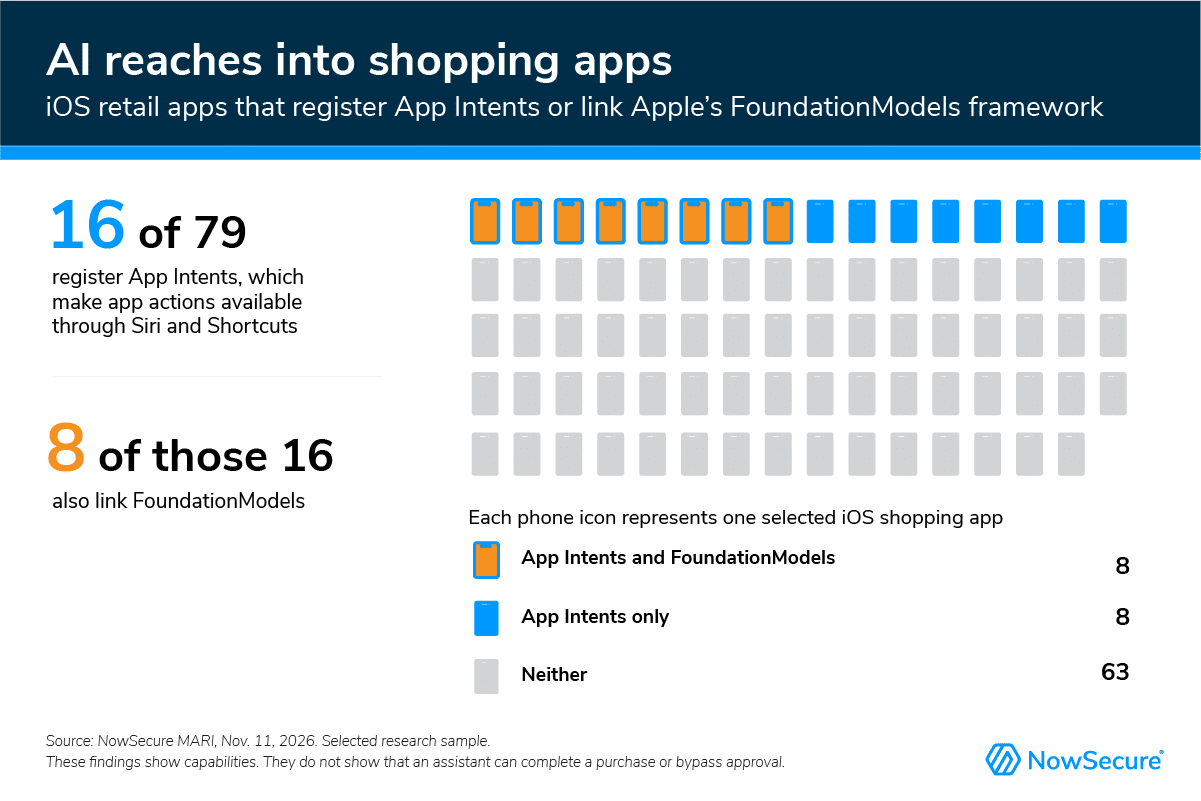
Why it matters: Convenience is the point, but every action an app opens to Siri or an AI assistant is also a new way into the app, alongside the screens you tap. Each of those paths needs the same protections as the app itself. It should confirm it’s really you, check what’s being requested and ask before anything is bought or changed. If those checks are weaker on the new path, an assistant could see information or take actions you didn’t intend.
That matters more as shoppers hand over control. In Accenture’s survey, shoppers said they would let an AI agent spend an average of $102 on gifts without asking for their approval.
Our findings show capabilities, not proof that any assistant can buy something on its own. They do show AI features reaching apps that hold your accounts, orders and payment details.
Gift research is personal, too. Depending on what you share, an assistant may learn the names, interests, photos and clothing sizes of the people on your list, along with your budget.
What you can do: Before connecting an assistant to your accounts, think about what information it really needs. If you let it complete a purchase, make sure it asks you to approve the exact item, merchant, quantity, total price and recipient first.
Nearly Two-Thirds of Shopping Apps Sent Personal Data to Trackers
Shopping apps aren’t built by one company alone. Behind the storefront, they rely on services from many providers for payments, analytics, personalization and more. Those connections are usually invisible to shoppers.
In 97 of the 155 shopping apps we assessed (63%), we saw personal data being sent to tracking or analytics services. That doesn’t mean the data was stolen or misused. But every company that receives your data is one more place where it can be stored, combined with other information or exposed in a breach.
AI apps showed the same behavior at a lower rate. Among 31 AI assistant and AI-enabled apps we examined, 10 sent personal information to tracking or analytics services, and two sent personal information to AI services. Thirteen of the 31 showed signs of using both on-device and cloud AI. That means an app with on-device AI may also use cloud AI.
What you can do: Ask four questions about any app or AI feature. What information does it need? Where is it processed? What does the company keep? How can I delete my data or disconnect my account? Retailers and assistant providers should make those answers easy to find.
Android Travel and Payment Apps Showed a Risky Pairing More Than Twice as Often as Shopping
Holiday shopping goes beyond retail. Flights, hotels, food delivery and payments bring more apps and accounts into the mix, and in our testing, travel and payment apps stood out.
Two settings are worth understanding together. First, Android apps can share files with other apps on your phone, a bit like a shared folder. If that folder is set up too broadly, more files can be reachable than the app intended. Second, many apps store sign-in information on your phone so you stay logged in.
Either one on its own is common. When an app has both, security teams need to check whether that shared folder could reach the sign-in information. That pairing appeared in 58% of the Android travel apps we examined (42 of 73) and 48% of Android payment, buy-now-pay-later and wallet apps (32 of 66), compared with 20% of Android shopping apps (15 of 76).
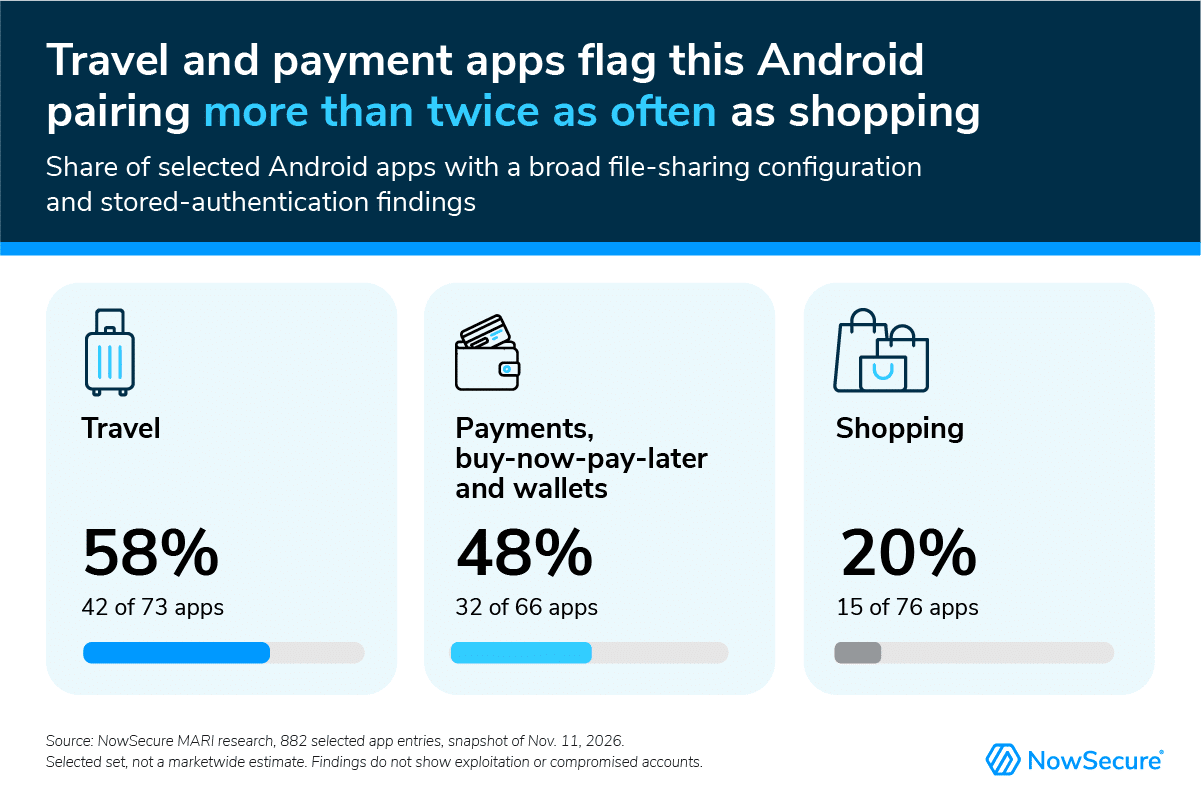
These are leads for investigation, not evidence that any account was compromised. Security teams can find the technical detail under Android File Sharing and Stored Authenticators below.
What you can do: This one is mostly in the app maker’s hands. You can’t change how an app shares files. What you can control is how useful a stolen sign-in would be: use a strong, unique password and turn on two-factor authentication for travel, payment and wallet accounts.
About Half of Apps Contain Outside Code Flagged for Known Vulnerabilities
Apps don’t run on their own code alone. They also use ready-made parts from other suppliers, such as libraries, frameworks and software development kits (SDKs) that handle networking, images, analytics and more. When one of those parts has a known flaw, the app maker has to update it.
Across all 882 apps we reviewed, 456 (52%) contained third-party components tied to known vulnerabilities. Nineteen of those 456 had vulnerabilities with a high predicted likelihood of exploitation, including six shopping apps. That prediction reflects how likely a flaw is to be exploited somewhere in the world, not the odds that a particular app or shopper will be affected.
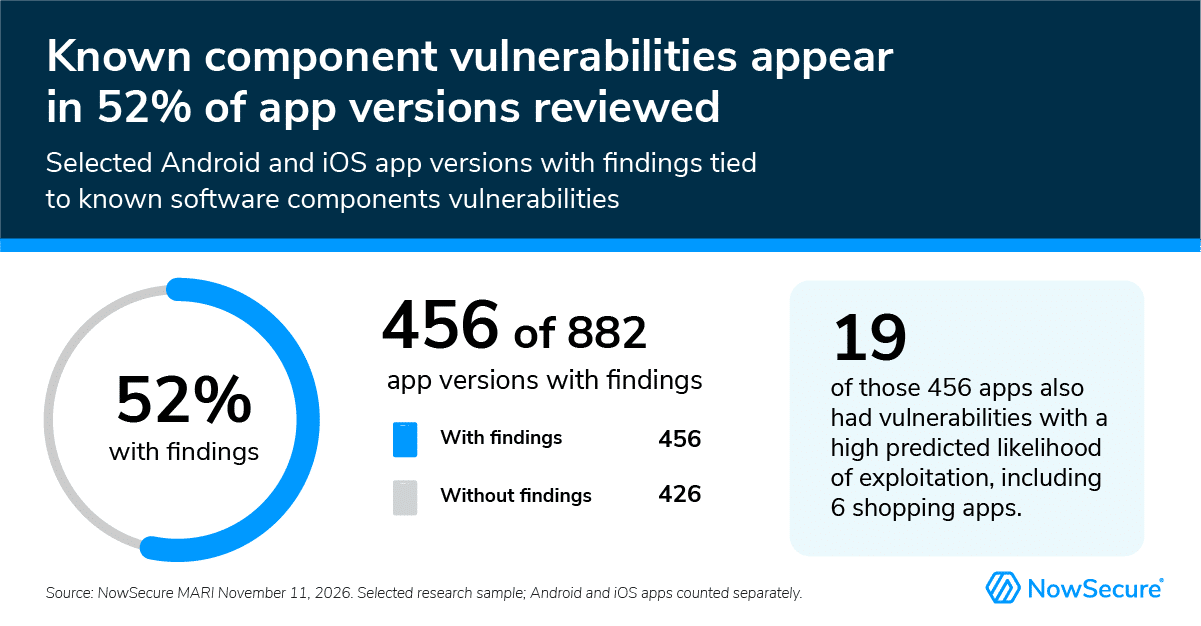
A flagged component doesn’t automatically put an app at risk. That depends on the version, how it’s configured and whether the app actually uses the affected feature. But it does mean a familiar brand’s app depends on the outside code inside it. An unpatched, publicly known flaw gives attackers a documented place to start.
What you can do: Install app updates promptly. Updates often include fixes for these outside components.
Six Ways to Shop Safer This Holiday Season
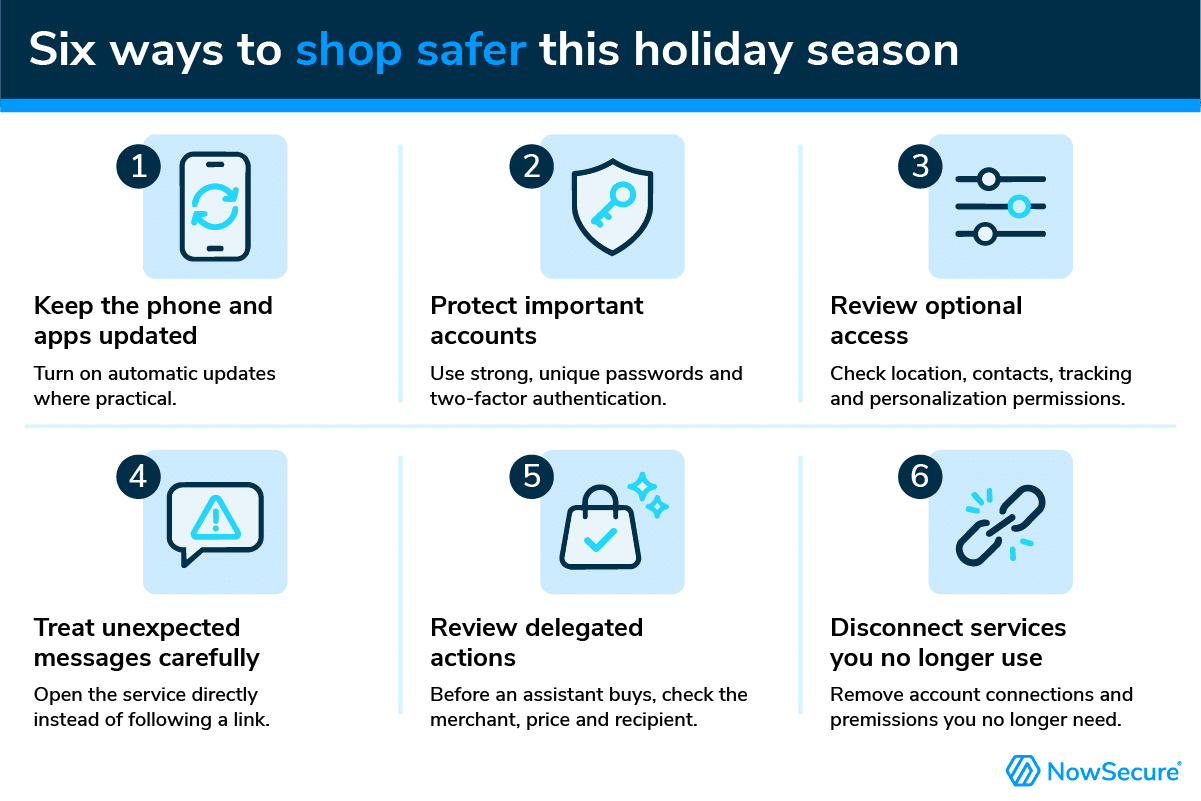
- Review delegated actions. Before an assistant completes a purchase or account change, check the merchant, price, recipient and permissions it is asking for.
- Keep your phone and apps updated. Turn on automatic updates where practical.
- Protect important accounts. Use strong, unique passwords and two-factor authentication wherever it is offered.
- Review optional access. Check whether location, contacts, tracking and personalization permissions fit the feature you want to use.
- Treat unexpected messages carefully. If you get a surprise delivery or account message, open the service directly instead of following the link.
- Disconnect services you no longer use. Remove account connections and permissions you no longer need.
What Retailers and App Providers Can Do Now
Shopping, payment, rewards and reservation apps carry revenue and customer trust. The challenge is keeping testing in step with change. A new partner SDK, payment option and AI feature can change what an app can see and do between security reviews. An app that came from a trusted brand, or passed testing a few releases ago, can still carry new exposure.
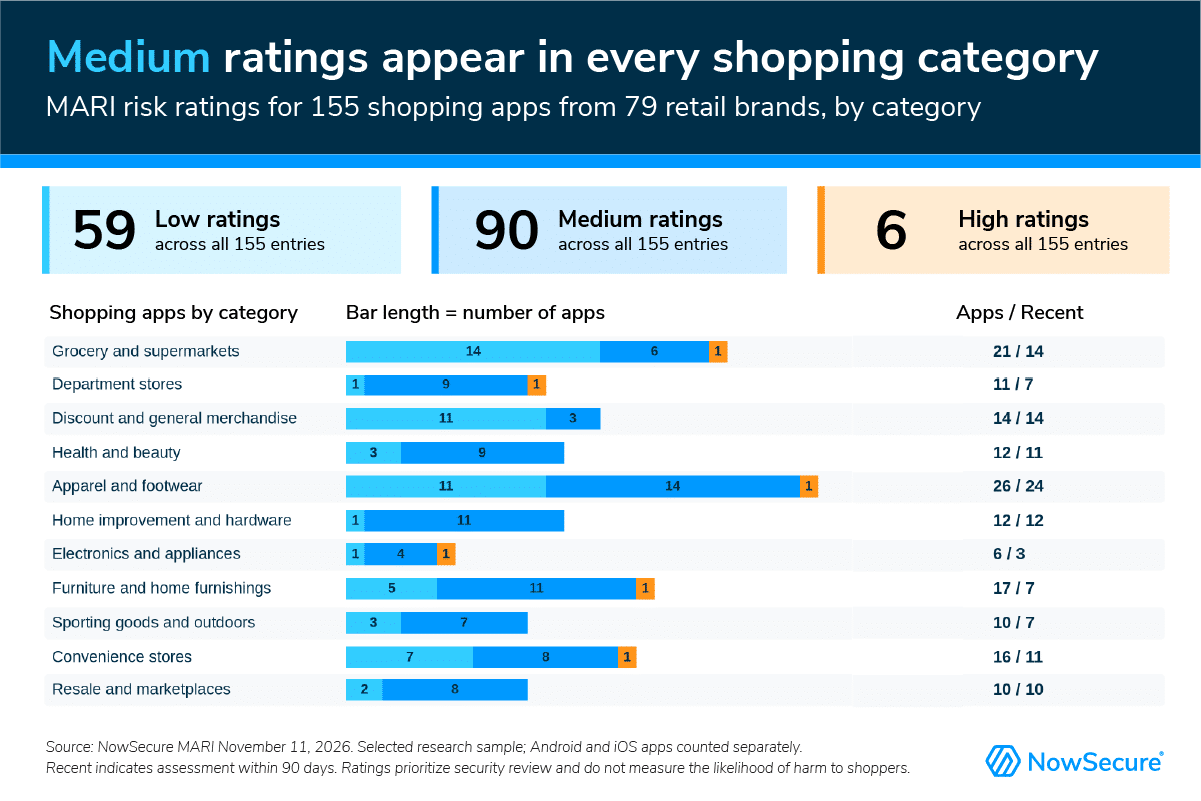
NowSecure MARI rated 612 of the 882 apps we reviewed as medium or high risk (86 high and 526 medium). These ratings help security teams decide where to look first. They don’t measure the likelihood of harm to shoppers. Among the 155 shopping apps, MARI rated six high risk, 90 medium and 59 low, and medium ratings appeared in every retail category we examined.
Every organization’s apps are different, so start by matching effort to what’s at stake. Use Mobile App Risk Management (MARM), or your own risk model, to set how deeply and how often each app is tested based on the revenue it supports, the sensitive data it handles, how many people use it and how many outside services it connects to.
From there, a strong mobile app security testing program combines several methods. Each one catches problems the others can miss:
- Static analysis: Examine the finished app, including the third-party components bundled inside it, for weaknesses in its code and configuration before it ever runs.
- Dynamic testing on real devices: Test real workflows such as signing in, connecting accounts and completing purchases, including the steps behind login and multifactor authentication. Some weaknesses only show up once someone is signed in and shopping.
- Network analysis: Trace the traffic between the app, the company’s own servers and outside services to see where sensitive information travels and whether those connections are properly protected.
- Human penetration testing: Security experts probe complex purchasing workflows and the boundaries between accounts and user roles, such as whether one customer could reach another’s information. They also check whether separate, minor-looking findings could be chained together into a real attack.
- AI feature reviews: Examine what information AI features can access and what actions the app and connected AI assistants can take. Confirm that purchases and account changes require the customer’s explicit approval.
Combine continuous automated assessment, which keeps pace with frequent releases, with focused expert reviews of signed-in workflows and human penetration testing. Assign each finding to the team that can fix it, whether that’s the app team, the backend team or an outside supplier, then retest to confirm the fix works.
For Security Teams: Four Areas That Deserve a Closer Look
We looked for findings that combine within the same assessment. Risk becomes real when one weakness lets an attacker reach what another exposes. A combination doesn’t prove a connected attack path, but it shows where to test next.
1. Connection Security (MASVS-NETWORK)
What we found: 49 of 882 apps (5.6%) had at least one selected connection-security finding: a certificate-authority or hostname-validation failure, sensitive data sent over HTTPS without proper certificate validation or personal data sent in cleartext. Among the 155 shopping apps, dynamic testing caught certificate-authority or hostname-validation failures in two, while 68 had static configurations that permit insecure connections.
Why it matters: An attacker able to intercept an affected connection could read or change its traffic. The consequence depends on the information and functions using that connection.
What to check: Which connections fail validation, and which information and features rely on them. Treat the 68 permissive configurations and the two observed failures differently: a setting that allows insecure connections does not show that sensitive data actually traveled over one.
2. Android File Sharing and Stored Authenticators (MASVS-STORAGE, MASVS-PLATFORM)
What we found: 129 of 467 Android apps (28%) combined a broad FileProvider configuration with stored-authenticator findings, including 15 of 76 Android shopping apps. Five of the 15 shopping apps were rated low risk overall.
Why it matters: FileProvider is how Android apps share specific files with other apps. Broad paths can make unintended files addressable. If one of those files holds a reusable credential, the consequence could extend to account access.
What to check: Confirm whether a sensitive file falls within the sharing scope, whether another app can get a read or write URI grant and what the stored value allows. Separate reusable customer credentials from public identifiers and SDK keys meant for distribution. Limit sharing to the files and permissions the app needs, then retest.
3. Embedded Browser Protections (MASVS-PLATFORM)
What we found: 30 of 467 Android apps combined four findings in the same assessment: a JavaScript bridge, code that proceeds past WebView certificate errors, WebView local-file access and stored authenticators. Four of the 76 Android shopping apps had the same combination.
Why it matters: If these behaviors connect in one reachable WebView, manipulated web content could interact with app functions or local information.
What to check: Identify the WebView, content origins, exposed native methods and accessible file paths. Determine whether untrusted content can reach those capabilities and whether any accessible file contains the flagged sensitive value. Verify certificate-error handling and the restrictions applied to bridges and file access.
4. iOS Cryptography and Stored Authenticators (MASVS-CRYPTO, MASVS-STORAGE)
What we found: 81 of 415 iOS apps (20%) combined hardcoded cryptographic keys observed in use at runtime, weak cryptography involving sensitive data and stored-authenticator findings, including 18 of 79 iOS shopping apps. All 81 were assessed within 90 days.
Why it matters: Encryption is only as strong as the secrecy of its keys. Accessible key material or a weak algorithm could undermine the protection applied to sensitive information.
What to check: Confirm the key is actually secret, then identify its purpose, the algorithm and the information it protects. Don’t assume the flagged key protects the stored authenticator, and don’t conflate cryptographic keys with API credentials.
Look Beyond the Overall Rating
Even among the 59 shopping apps rated low risk, 22 had personal-data internal-storage findings. An overall rating tells you where to start reviewing, not where to stop.
These counts are investigation priorities, not confirmed exploit chains. Confirming a real attack path means connecting the affected files, permissions, credentials and runtime behavior.
Assess your mobile apps with NowSecure Platform and work with NowSecure mobile penetration testing experts to validate the paths that automated findings alone cannot establish, before peak holiday traffic arrives.
Methodology
NowSecure reviewed 882 iOS and Android app assessments from a Nov. 11, 2026, snapshot of NowSecure Mobile App Risk Intelligence (MARI). Assessment dates vary. Researchers also used NowSecure Platform to examine the evidence behind selected findings. Those investigations apply only to the apps and builds examined.
Findings draw on app code, configuration, observed behavior and network communications. AI findings show framework references and registered interfaces, not necessarily an active autonomous shopping agent. Data transmission findings show observed destinations, not the exact data shared or its consent context.
The sample was selected, not random, so it does not show market-wide prevalence. Finding categories overlap and should not be added together.

“Mobile apps are the largest source of digital revenue during the holiday shopping season. AI assistants are adding a new layer of convenience, complexity and risk to the picture.”
Alan Snyder, CEO, NowSecure