Apple is changing how AI interacts with mobile apps. Siri AI can now discover application functionality, invoke actions and orchestrate workflows across apps. Here’s what that means for mobile application security and what AppSec teams should do before these capabilities reach production.
Apple has done something most security teams haven’t fully clocked yet.
With iOS 27, agentic AI stops being a demo and becomes a first-class part of the operating system. Siri AI can now reach into your app, retrieve information and invoke actions on a user’s behalf without requiring the user to open the app. Apple expects these capabilities to reach customers with its fall 2026 operating system releases, giving development and security teams a limited window to prepare.
I want to be direct about what this actually means because the framing matters. This is more than another AI feature announcement. It changes how users interact with applications and expands the security boundary beyond the app itself. This is first and foremost a business decision: Do you want your app and capabilities to be available to Siri AI and Agentic Workflows? Once that has been determined, it becomes a security challenge to ensure that the new code, capabilities and agentic workflows are secure.
Key Takeaways
- App Intents allow iOS applications to expose actions and data that Siri AI and Apple Intelligence can invoke on a user’s behalf. App Intents are not new and may already be in your app, what is new is the ability for Siri AI to use them in an agentic workflow.
- iOS 27 expands how Siri discovers, reasons about and orchestrates those actions across applications. If you are left out of the Siri AI workflow, organizations run the risk of being left out of consumer interactions.
- Google is pursuing a similar solution through Android AppFunctions, making this an industry-wide shift rather than an Apple-only change.
- AI-driven workflows introduce new pathways to application functionality that traditional mobile security testing was never designed to evaluate. There will be significant new code and configurations added to mobile apps to get them ready for Siri AI and to take advantage of all the new AI capabilities.
- AppSec teams should inventory App Intents, review authentication and confirmation requirements, update threat models and test complete AI-driven workflows before these capabilities reach production.
- This is a first-party and third-party app issue. Siri AI and Agentic workflows are coming to an app you build or use by the end of the year.
App Intents, Siri AI and the New iOS 27 Attack Surface
What are App Intents?
Developers already understand APIs. App Intents serve a similar purpose, but they are designed for the system (Siri, Spotlight, Shortcuts, widgets and, now, Apple Intelligence) to discover and invoke, rather than for other apps to call directly. An App Intent defines a specific action an application is able to perform along with the information required to perform it. Examples include sending a message, creating a reminder, finding a customer record or placing an order.
Until recently, App Intents primarily powered Siri, Shortcuts, Spotlight and widgets. In iOS 27, they become part of a much broader AI interaction model. Siri can understand an application’s available actions, determine which one best satisfies a user’s request and invoke that action as part of a larger workflow.
For AppSec teams, this changes how users reach application functionality. The application is no longer responding only to taps inside its own interface. If you are left out of the Siri AI workflow, organizations run the risk of being left out of consumer interactions.
What’s new in iOS 27?
Apple Intelligence gives Siri much broader visibility into application content and capabilities than previous versions of Siri.
With app schemas, developers describe common entities and actions in a standardized way so Siri can understand what information an application contains and what operations it can perform.
That allows Siri to coordinate work across multiple applications. A user might ask Siri to plan a business trip, summarize an email, reserve a restaurant and send the itinerary to colleagues in a single request. Siri determines which application capabilities can complete each step and invokes them on the user’s behalf.
The application still controls which actions it exposes. The difference is that it no longer controls when those actions are selected within a larger AI-driven workflow. This means that unintended behavior and consequences are possible and must be part of the testing regimen. Our recent 2026 Mobile App Risk Management Survey found most enterprise mobile apps already use AI capabilities, making visibility into AI interactions increasingly important.
“Mobile apps are becoming collections of callable capabilities rather than isolated user interfaces.”
How do App Intents change the mobile attack surface?
Traditional mobile security assumes users navigate an application’s interface before performing a sensitive action.
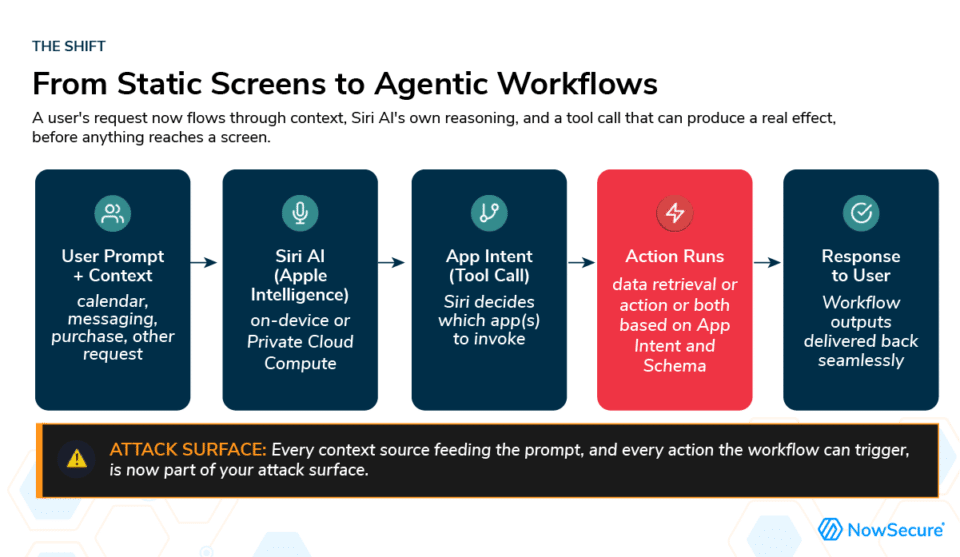
AI-driven workflows introduce additional pathways. An AI assistant may gather information from multiple applications, combine it with messages, calendars or documents, then invoke an app action without the user manually navigating through the interface.
This expands the security boundary. Security teams now need to understand:
- Which App Intents an application already exposes
- New App Intents that are added to an application
- Schema usage and proper implementation
- Which entities AI can discover
- Which actions require authentication or user confirmation
- What data may leave the application during an AI workflow
- How those workflows behave when presented with unexpected or malicious inputs
These requirements are in addition to traditional mobile application security testing. They also reinforce why OWASP Mobile Application Security Verification Standard (MASVS) remains an important foundation for evaluating mobile applications, even as AI introduces new interaction models.
The decision your product team is already making
Here’s the part that catches many organizations off guard.
If your development team is evaluating Siri AI support, they are also deciding which application functionality AI agents will be allowed to discover and invoke. Those decisions affect security, privacy and governance, even if they are framed as user experience improvements.
Many organizations still have limited visibility into where AI already exists inside their mobile applications. Our recent research found AI adoption has expanded much faster than governance and monitoring practices.
A customer might ask Siri to plan a trip. Siri looks across available applications and system capabilities, determines which actions can satisfy the request and coordinates them into a single workflow. It is beneficial for the user and the brand to be part of the workflow.
Your application defines the available actions. Siri may decide when those actions best fulfill the user’s request. This changes a long-standing assumption in mobile security.
Historically, applications have been treated as self-contained systems. Security teams focused on protecting the binary, validating APIs and securing the user interface.A request can now pass through an AI model before reaching the application, with context drawn from multiple sources outside the application’s control. The security boundary extends beyond the app itself.
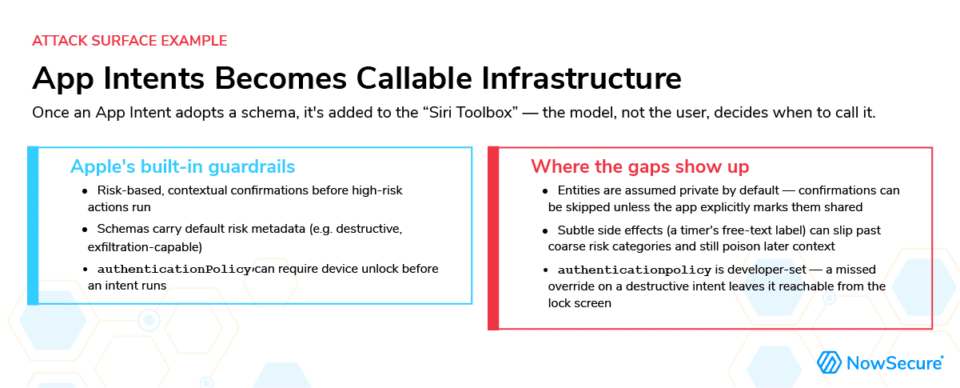
Apple deserves credit for their well-thought-out approach to agentic workflows and building safeguards into the model.
It helps to see how these pieces connect. A developer defines an App Intent in their own code: the actions and data their app can expose. Adopting an app schema maps that intent to Apple’s standardized vocabulary, including inherited risk metadata and a default authentication policy that the developer does not have to declare manually.
At runtime, Siri AI decides which registered action, potentially from several apps, best satisfies a person’s request. It can chain multiple actions together rather than execute one fixed command. Because risk metadata varies by action, it shapes what happens immediately before the action runs. Higher-risk actions trigger a confirmation prompt. If the user declines, the action never executes.
iOS 27 changes how teams should think about mobile applications. Instead of treating apps as interfaces users navigate directly, organizations must view them as collections of callable capabilities that Siri AI can discover, evaluate and invoke as part of larger workflows. For AppSec teams, that means testing not just what an app can do, but how AI agents reach those capabilities, what context they use and which safeguards apply before an action executes.
Authentication policies are not automatically applied to every intent. Applications also determine which entities can be discovered and shared. A configuration mistake may expose sensitive functionality or information in ways the development team never intended.
These are the kinds of implementation details that become critical to understand and test once dozens of new intents, schemas and AI workflows have been added under a product deadline.
Five things AppSec teams should do now
I’d rather give you a checklist than a warning.
- Talk to product and engineering. Determine whether Siri AI or Apple Intelligence support is already on the roadmap.
- Expand your threat model. Consider the complete AI-driven workflow, including prompts, context sources, other applications and external models.
- Inventory App Intents and app schemas. Know exactly what functionality your application exposes and which actions require authentication or user confirmation.
- Test complete workflows. Traditional UI testing alone won’t expose every AI interaction. Validate AI-driven interactions, not only application screens. Combine automated analysis with hands-on testing of real Siri workflows.
- Monitor data movement. Understand which models receive application data, how that changes over time and whether sensitive information reaches providers you did not intend to use.
The work starts before users do
Apple and Google are both moving toward AI assistants that can discover, reason about and invoke application functionality. Mobile apps are becoming collections of callable capabilities rather than isolated user interfaces.
Google is pursuing the same shift through Android AppFunctions, which let applications expose structured functionality to Gemini and other system intelligence. The implementation differs from Apple’s, but the direction is the same. Organizations supporting both platforms should expect these architectural changes to affect both over time.
For security teams, that means understanding more than the application itself. It means understanding which capabilities AI agents can discover, what actions they can invoke, what context they use and how those interactions behave under real-world conditions.
The organizations that begin this work now will be in a much stronger position when these capabilities become mainstream. Those that wait until after launch may discover new exposure only after customers begin relying on AI-driven workflows.
Watch our recent webinar, “Your Agentic Security Blueprint for iOS 27” to learn more.