App Store Security Myths: Why Enterprises Can’t Solely Rely on Apple and Google for Security Reviews
Posted by Amy Schurr

When enterprise mobility managers, end-user computing (EUC) managers and IT security teams evaluate third-party mobile app risk for business use, a common misconception arises: If an app is available in the Apple App Store or Google Play Store, it must be secure and free of privacy risks. The reality is that Apple and Google app reviews primarily focus on catching malware, not mobile application security and privacy issues.
While Apple and Google both implement rigorous app review processes to prevent malware and policy violations, their vetting primarily focuses on ensuring compliance with content policies and blocking overtly malicious software — not on conducting in-depth mobile application security testing. Do you expect Apple and Google to do the functional testing of all mobile apps in the App Store? Of course not, so why would they be expected to perform security testing, which requires app authentication and navigation similar to functional testing? End-user computing groups hold responsibility for creating and maintaining a secure mobile workforce by ensuring third-party mobile apps are safe for business use in their organizations.
To protect sensitive enterprise data, reduce compliance risk and secure employee mobility, organizations must implement third-party mobile app risk assessments as part of their mobile device management (MDM) and enterprise mobility management (EMM) strategies.
Real-World Third-Party Mobile App Risk
Each year despite the significant efforts of Apple and Google, many mobile apps with security and privacy issues land in the App Store and Google Play Store. Here are a few examples.
- A Cybernews report revealed that 110,000 iOS apps contained hardcoded secrets such as API keys and private credentials, exposing them to security risks.
- Recent NowSecure analysis uncovered multiple security and privacy vulnerabilities in the popular DeepSeek AI iOS app.
- A malware strain called SparkCat used Optical Character Recognition (OCR) technology to extract sensitive information from users’ screenshots to steal cryptocurrency wallet passwords.
- McAfee identified 15 malicious quick loan Android apps, collectively referred to as SpyLoan, that collected sensitive data, leaving users vulnerable to financial loss and extortion.
How Apple and Google Vet Apps for Security & Privacy
Apple and Google scrutinize the apps developers seek to publish in their respective app stores. They take these measures to protect their brands, safeguard mobile ecosystems and respect user privacy. Both block millions of low-quality or harmful apps that have malicious internet or contain objectionable content such as violence, hate speech or child endangerment.
Apple App Store Review Process
Apple employs a combination of automated scanning and human review to ensure apps and updates comply with its guidelines:
- Automated malware scanning detects known threats before apps are approved
- Human reviews check app descriptions for accuracy to counter common scams
- Manual checks assess whether an app unnecessarily requests access to sensitive user data and closely scrutinize apps targeted at children for compliance with data collection and safety rules
- Trustworthy, centralized user reviews help surface issues and reduce deception
- Privacy policy enforcement requires developers to disclose data collection and usage practices via self attested Privacy Nutrition Labels
- Ongoing monitoring results in swift removal of apps found to contain malicious components post-approval.
Apple’s security framework emphasizes preventing harmful apps from reaching users and ensuring compliance with privacy standards. According to the 2023 App Store Transparency Report, Apple rejected 1.76 million app submissions that year. More than 103,000 were rejected for safety reasons.
The reality is the Apple Store and Google Play cannot guarantee that a mobile app is entirely secure or free from privacy risks.
Google Play Store Review Process
Google Play also uses a mix of automation and human oversight to enforce its app security policies:
- Google Play Protect continuously scans installed apps for malware
- Machine learning analysis identifies potentially harmful applications before they reach users
- Developer identity verification prevents fraudulent submissions
- Testing requirements for personal developer accounts aim to improve app quality
- Privacy policy requires developers to provide this information both within the app and in the Google Play listing
- Data Safety section requires developers to accurately disclose how they collect, store and share user data
- Optional App Defense Alliance Mobile Application Security Assessment (ADA MASA) independent security reviews verify that a mobile app meets OWASP industry standards for security and privacy.
In 2024 alone, Google blocked 2.36 million policy-violating apps from being published.

What App Store Reviews Miss
While Apple and Google focus on blocking harmful and deceptive apps, their reviews don’t serve as comprehensive mobile app security audits. They don’t perform deep security testing or penetration testing on individual apps — and issues like data leakage often won’t surface when scanning for known vulnerabilities. In fact, both Apple and Google recommend independent application security testing of mobile apps.
Vulnerabilities still surface in approved apps due to issues such as insecure data storage, API misconfigurations and third-party SDK risks. In addition, mobile app developers may provide inaccurate privacy information.
Some key areas of concern include:
- Zero-day vulnerabilities that attackers can exploit after an app is published
- Business logic flaws that can allow unauthorized access or privilege escalation
- Third-party SDK vulnerabilities that introduce security gaps developers may not be aware of
- Hardcoded secrets or exposed API keys that could lead to data breaches
- Covert tracking, fingerprinting and dark patterns that may not explicitly violate app store policies but pose privacy concerns.
Is It Safe to Use Public App Store Apps for Business?
The reality is the Apple Store and Google Play cannot guarantee that a mobile app is entirely secure or free from privacy risks. “Though App Store security measures alone can never be perfect, as part of a defense-in-depth strategy for platform security they contribute to making widespread attacks against iOS, iPadOS, and visionOS users impractical and uneconomical for financially-driven attackers,” states Apple.
What’s more, enterprises operating in the European Union (EU) don’t have the same level of public app store protections due to requirements of the EU Digital Markets Act (DMA). The DMA allows third-party app stores and sideloading of mobile apps which will introduce greater security and privacy risks.
Why Enterprises Need Third-Party Mobile App Risk Assessments
To effectively manage mobile risk across corporate devices, enterprise mobility managers and end-user computing leads shouldn’t rely solely on app store reviews. Instead, they should conduct third-party mobile app risk assessments to evaluate mobile apps before allowing employees to put sensitive company information in them.
A robust third-party mobile application risk management assessment program should include:
- Continuous automated mobile application security testing for security and privacy risks
- Adoption of industry-based standards such as OWASP MASVS
- Mobile app governance that defines acceptable use and risk policies
- Proof of security testing and controls for compliance purposes.
How to Evaluate Third-Party Mobile Apps for Business
Although Apple and Google play a critical role in maintaining a secure mobile app ecosystem, the responsibility for ensuring only safe apps are allowed via a mobile app risk management program ultimately falls on the organization because it owns the consequences of a breach.
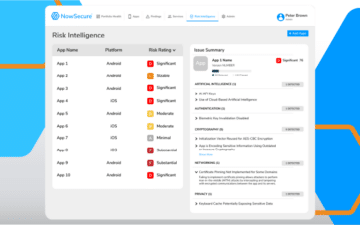
Conducting third-party mobile app risk assessments with an automated solution such as NowSecure Mobile App Risk Intelligence (MARI) enables IT security teams, end-user computing pros and enterprise mobility managers to confidently conduct mobile app vetting before deployment and maintain security as the apps are updated. It is easy to do and integrates into existing third-party risk programs.
Schedule a demo today to see how to proactively protect your organization from risky third-party Android and iOS apps.